Delta
Field Ops App
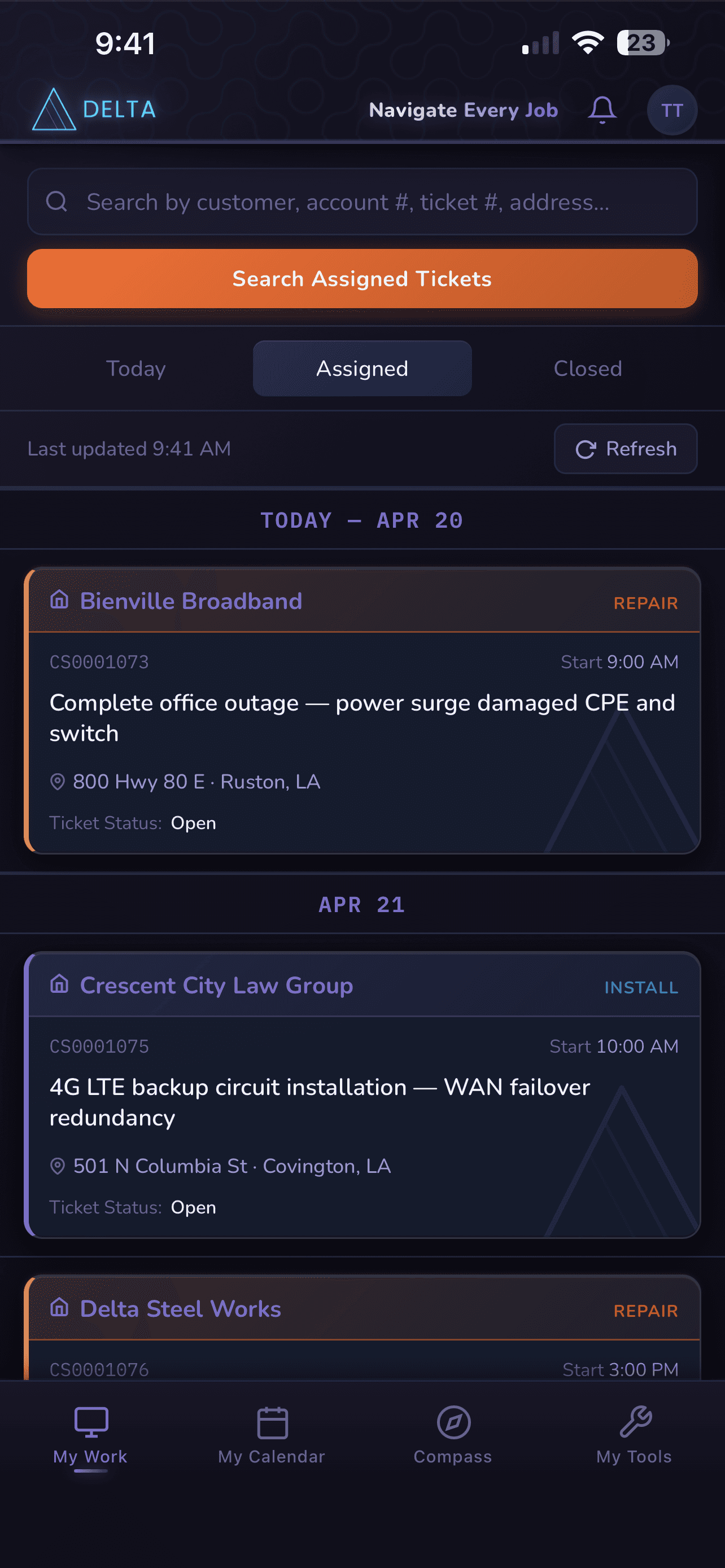
A mobile-first progressive web app built for field technicians managing enterprise service tickets. Delta consolidates ServiceNow CSM ticketing, Cisco Catalyst Center network data, and a Webex Calling/VoIP reference layer into a single unified interface, built around real workflows from my role as a Voice and Data Technician at C Spire. Built as a single HTML file (~7,700 lines) with no framework, no build step, and no dependencies beyond a lightweight Node.js CORS proxy for Catalyst Center API access. Runs as a PWA on iPhone directly from the browser, with no App Store deployment required.
// Section 02
The Problem
Imagine this: you’re starting your day as a technician, looking at your first ticket. The notes give you a brief description of the problem and nothing more. So you head on site to solve the issue, only to find you have gaps in knowledge that you need to complete your task. Finding the information is time-consuming and not always easy, and can lead to more mistakes than solutions. This is the issue techs face every day. Reduced performance, increased errors and diminished professionalism due to gaps in knowledge about customers services and issues. Asking customers about what services they have instead of confidently telling them what is there on site.
After what felt like the 50th time asking a customer what we do for them, I chose to try to find a solution to this issue, and put my experience to the test. Initially I was only planning to sketch out some ideas to present to upper management so they could know our struggle, but eventually I had a realization; what if I could not only tell them what I wanted, but show them an ideal solution that could become a reality. And so the Delta app began to take form, as a way to show proof of concept of what I felt could be a very viable solution to a very real problem.
// Section 03
Role, Context & Goals
- Consolidate ServiceNow ticket management, customer context, and field compliance into a single mobile interface
- Eliminate the need to context-switch between systems while working a job in the field
- Give technicians SLA visibility, live navigation, and on-site status tracking without relying on multiple logins across multiple platforms
- Demonstrate full-stack development capability without a framework — intentional constraint to show depth
- Architect the app for real integration with internal C Spire systems with clean stub/mock layers as placeholders
- Build something installable as a PWA on iPhone with no App Store deployment required
// Section 04
Technical Approach
The entire application — approximately 8,000 lines — lives in a single HTML file with no build step, no npm dependencies, and no framework. This was a deliberate constraint, not a limitation. The goal was to demonstrate that complex, production-grade UI behavior can be achieved with a thorough command of the browser’s native capabilities: CSS custom properties, the Fetch API, the History API, IntersectionObserver, AbortController, and sessionStorage. The single-file format also made deployment trivial — the app runs as a GitHub Pages site and installs directly as a PWA from Safari on iOS.
| Integration | Approach |
|---|---|
| ServiceNow CSM | Direct REST calls to sn_customerservice_case table via snFetch() wrapper with AbortController timeout (12s), in-flight GET deduplication, and a 2-hour stale-cache fallback for offline resilience |
| Cisco Catalyst Center | Authenticated Node.js CORS proxy hosted on Railway; handles session token acquisition, 5.5-hour token caching, and automatic re-auth on 401 |
| Geocoding + Routing | Nominatim (OpenStreetMap) for address geocoding with US country-code filter and city/state fallback; OSRM for drive-time estimation |
| Demo Mode | Embedded mock data layer activates automatically when ServiceNow is unreachable or via explicit "Preview without login" — all mock data is date-relative so it’s always "today" regardless of when viewed |
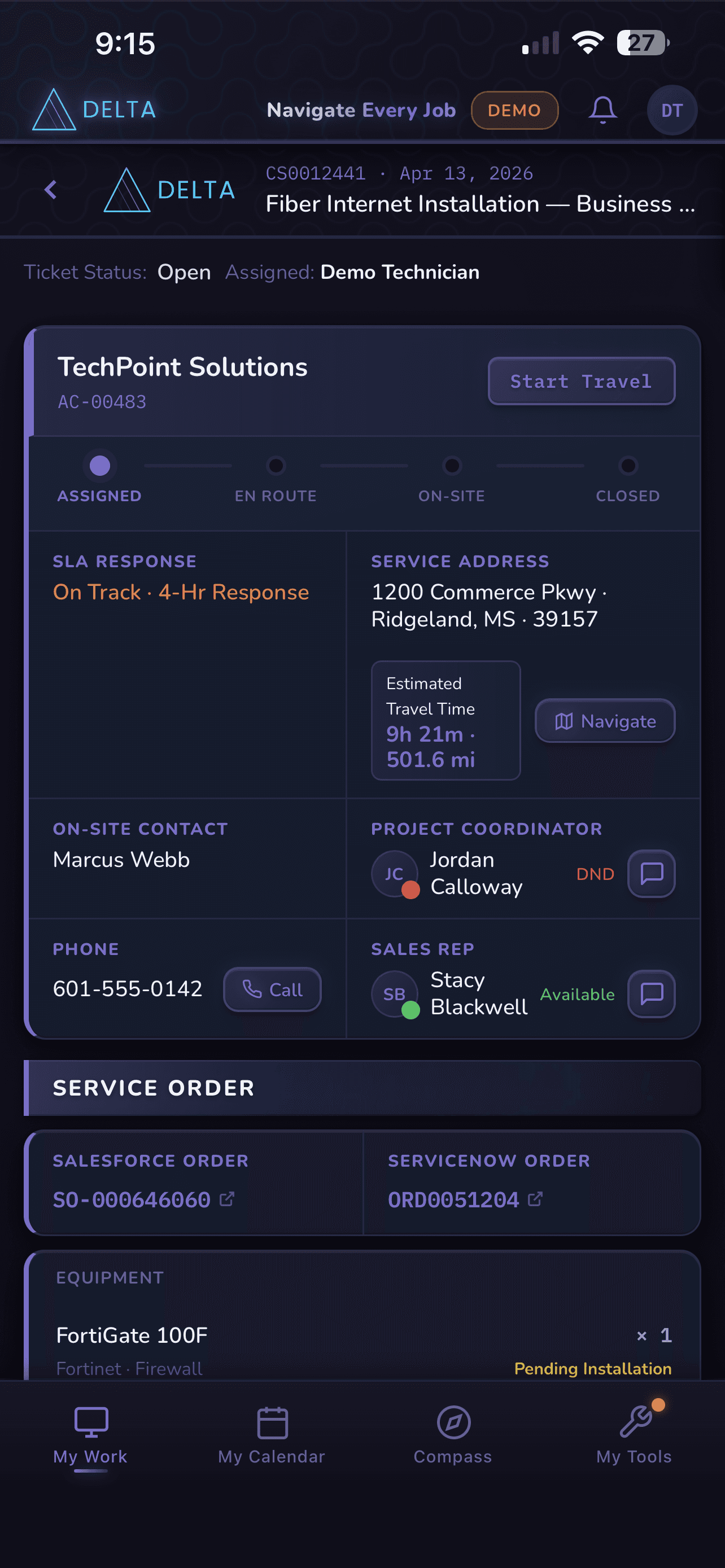
Ticket workflow state is managed through a four-step client-side state machine: travel → work → close → done. State is persisted to sessionStorage to survive SPA navigation and PWA lifecycle events. On case load, the current SN ticket state seeds the machine — if already resolved, it initializes directly to done. The lifecycle progress strip and action button both read from the same state source.
- Credentials stored in sessionStorage only — never localStorage — so they are not persisted beyond the active session
- All API-sourced content is passed through escHtml() before DOM insertion to prevent XSS
- All network requests use AbortController with explicit timeouts to prevent hanging connections
- viewport-fit=cover and apple-mobile-web-app-capable for full-bleed iPhone display
- manifest.json with home screen icon and theme color matching the indigo palette
- Safe-area inset handling via CSS env() for notch/island compatibility
- Mobile bottom nav switches to desktop top nav at 800px breakpoint
// Section 05
Key Features
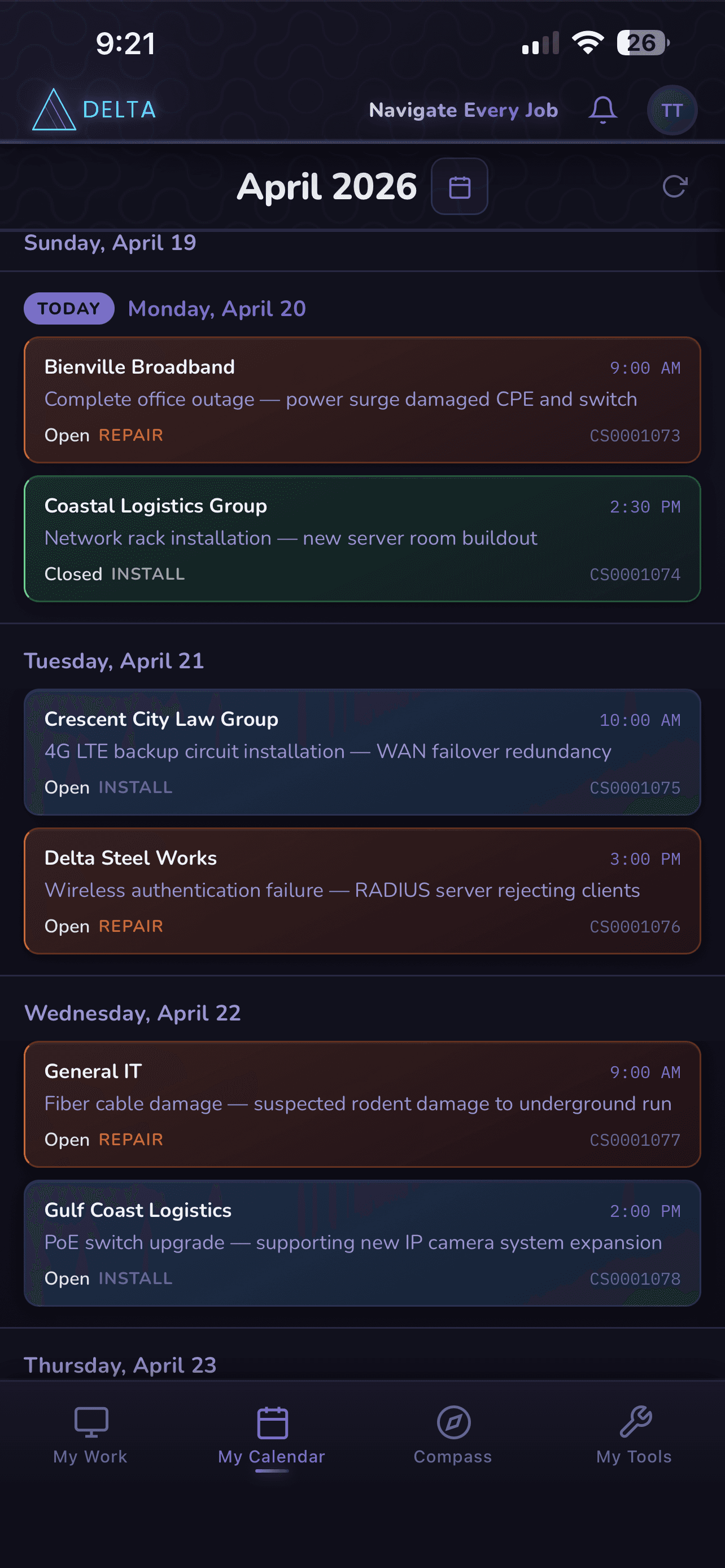
Tickets grouped by scheduled date, color-coded by type (Install/Repair/Closed). Detail view surfaces customer context, SLA status, service address with drive-time estimate, equipment data from CMDB, and a four-step lifecycle progress strip. Five parallel async sub-fetches populate the detail screen — assignee, SLA, account, contact, and CMDB — without blocking the initial render.
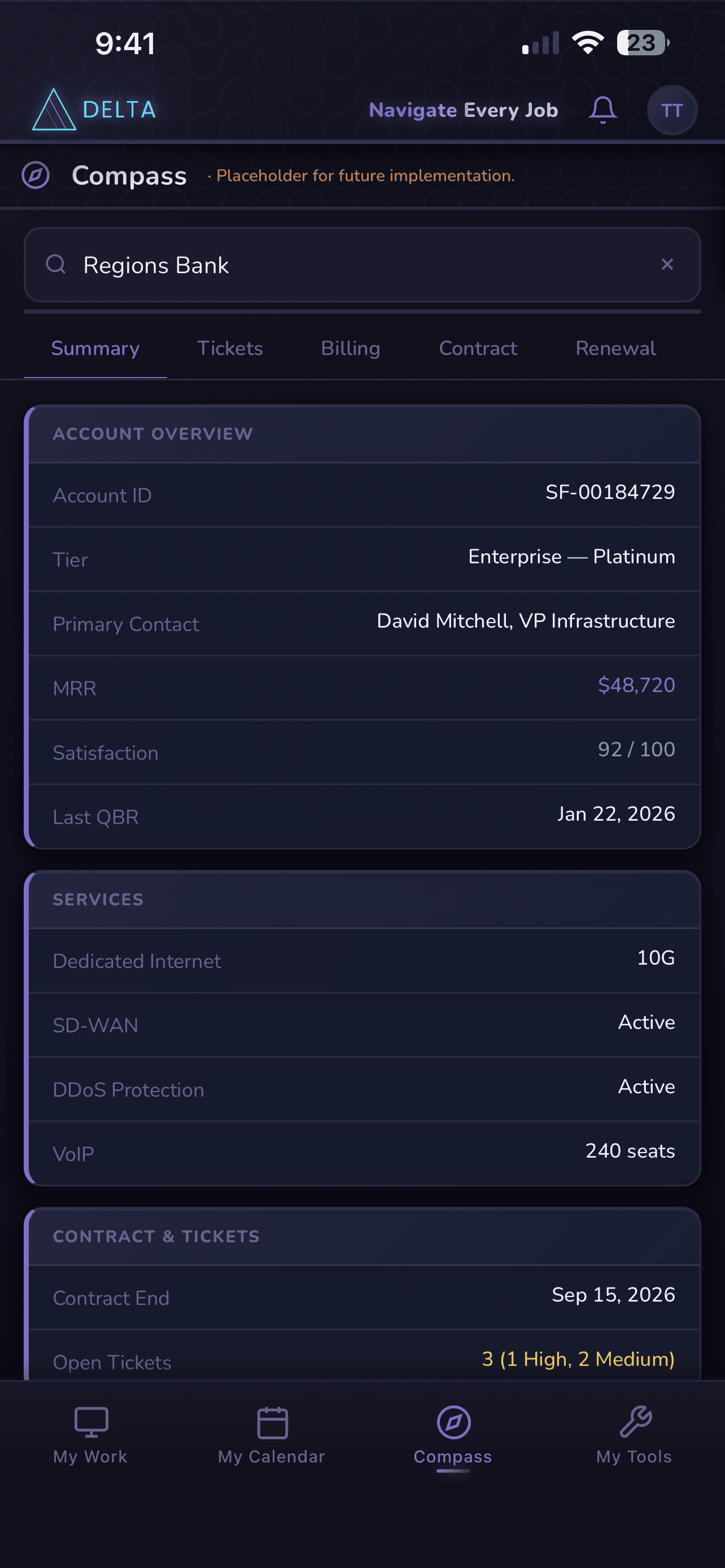
Account search with typeahead, five-tab brief strip (Summary / Tickets / Billing / Contract / Renewal), and frosted-glass section cards matching the ticket detail visual treatment. Designed as the field brief a tech needs before arriving on site.
Week, month, and agenda views with ticket chips linked directly to ticket detail. Safety inspection and inventory due dates surface automatically as calendar banners. Hidden on mobile bottom nav due to viewport constraints; accessible via desktop top nav.
Live device telemetry from Cisco’s DevNet sandbox via authenticated proxy. Devices grouped by type in list view; canvas-drawn topology diagram in map view. Graceful error state when sandbox is unavailable, with retry.
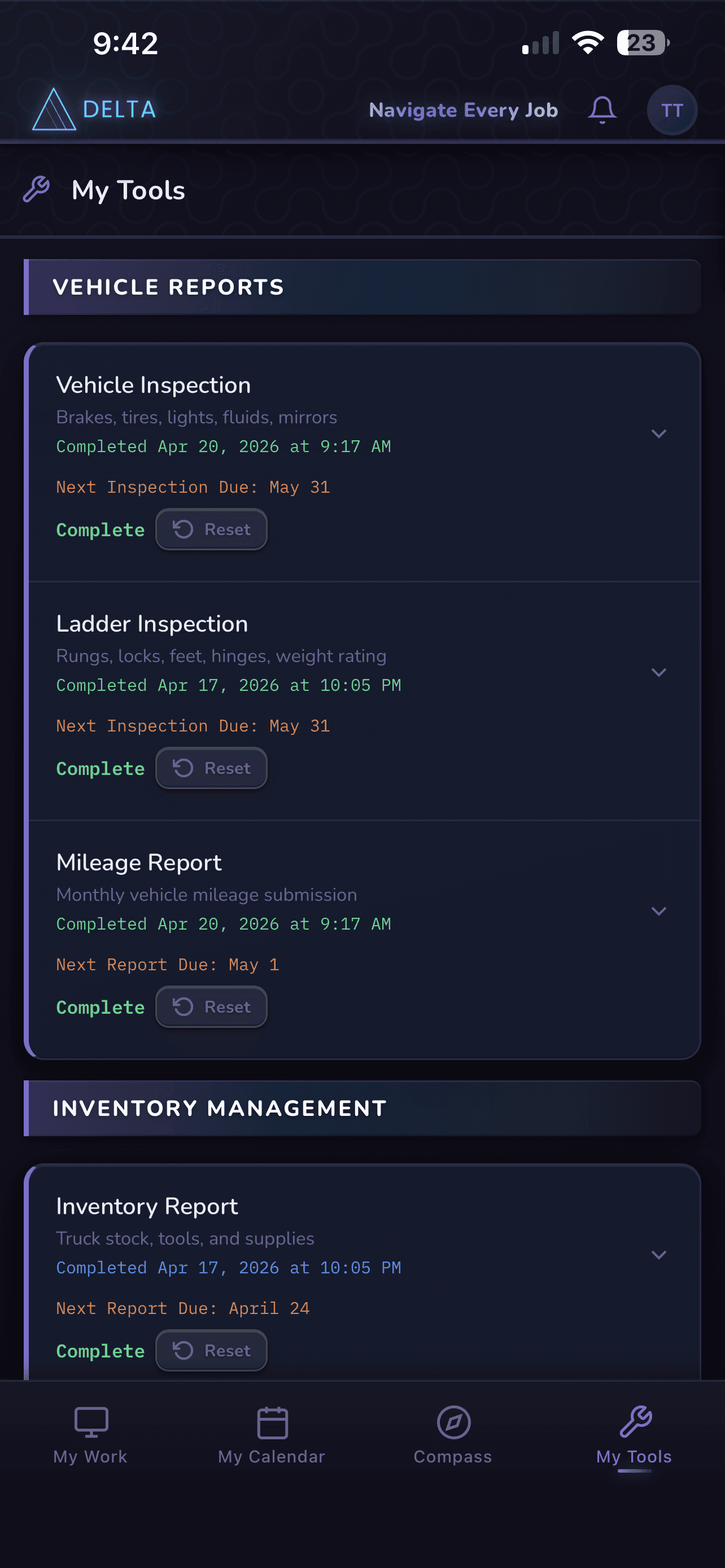
Vehicle inspection, ladder inspection, mileage reporting, and truck stock inventory tracking with configurable reminder frequencies, urgency escalation, and a badge indicator on the nav tab. On-call line and Teams contact directory with presence stubs.
// Section 06
Challenges & How They Were Solved
ServiceNow and Catalyst Center don’t allow direct browser-to-API calls due to CORS.
The app needed to work for live reviewers even when the SN dev instance was sleeping or Cisco reset the sandbox credentials.
_ticketActionState was initially in-memory only, so navigating away from a ticket and back would reset the action button to ‘Start Travel’ even if the tech was already on-site.
ServiceNow dev instances don’t have access to the same FSM module used in production environments, so actual work tickets could not be used.
// Section 07
Results & What I Learned
- Currently working on getting access to internal environments to hook in to identical non-production sandboxes for testing purposes.
- Installs as a PWA on iPhone directly from Safari with no App Store deployment, and runs in desktop mode on tablets and other 16:9 resolution devices.
- Demo mode allows any reviewer to experience the full ticket workflow without credentials.
With this being my first web app, I learned quite a few different skills and ways to tackle problems. Built primarily with Claude, I would never consider myself a developer, at least not yet. However, it really expanded my toolset and showed me what was possible with proper vision and determination. It wasn’t too long ago that I would not have tried something of this complexity, but with the proper idea and motivation, I was able to grow in ways that I did not expect. And I plan to continue to take that hunger for knowledge and growth into my next projects and work opportunities.
// Section 08
What’s Next
The app is architected with documented stub layers designed as transparent drop-in replacements for live integrations. Planned next steps:
| Layer | Technology |
|---|---|
| Frontend | Vanilla HTML/CSS/JS — no framework |
| API Integration | ServiceNow Table API, Cisco Catalyst Center (via proxy), Nominatim, OSRM |
| Proxy | Node.js (http/https modules), hosted on Railway |
| Deployment | GitHub Pages (PWA) |
| Design System | CSS custom properties, indigo/violet dark palette, mobile-first responsive |
| Auth | HTTP Basic (ServiceNow), session token with auto-refresh (Catalyst Center) |
| Offline Support | In-memory cache with 2-hour stale fallback, demo mode auto-activation |