NetAudit
Automation Lab
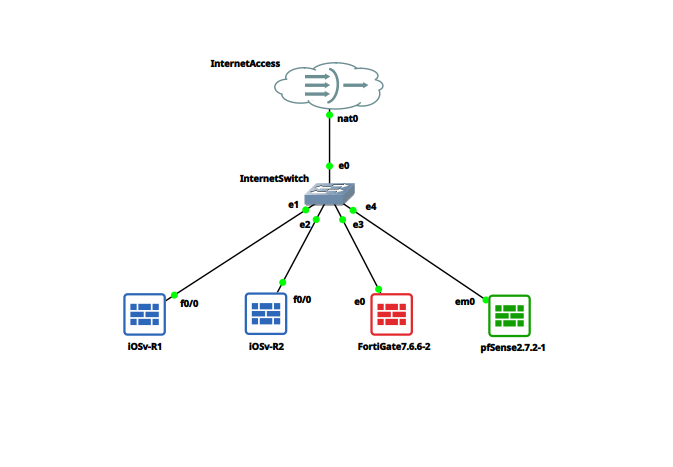
A multi-vendor network automation toolkit that pulls configs from live devices, audits them against compliance rules, detects drift from a known-good baseline, and generates Ansible playbooks to remediate gaps. Built in Python, tested against a live GNS3 lab running Cisco, FortiGate, and pfSense.
// Section 02
Architecture
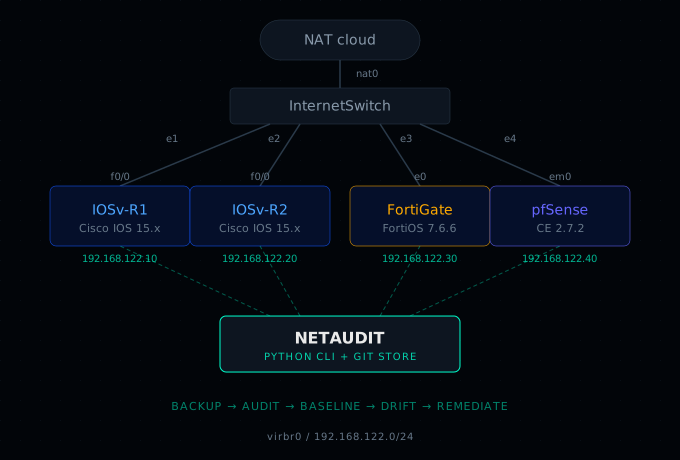
NetAudit is a Python CLI built around a connector abstraction layer. Each network vendor gets its own connector class that implements a shared interface for pulling configuration. Cisco IOS and FortiGate use Netmiko; pfSense uses raw paramiko (its SSH session drops into a menu, not a standard shell). The orchestrator does not know or care which library each connector uses.
Backed-up configs land in a dedicated git repository. Every backup run that produces a change gets a commit with a timestamp and device summary. Compliance rules are YAML files with regex patterns and pass/fail expectations. Drift detection is a git diff between a baseline tag and HEAD. The entire audit trail is the commit history.
Lab Devices
| Device | Driver | Version | Role |
|---|---|---|---|
| IOSv-R1 | cisco_ios | Cisco IOSv 15.x | Core router |
| IOSv-R2 | cisco_ios | Cisco IOSv 15.x | Edge router |
| FortiGate | fortigate | FortiOS 7.6.6 | Firewall |
| pfSense | pfsense | pfSense CE 2.7.2 | Firewall / router |
// Section 03
Config Backup
A single command pulls running configurations from every enabled device in the inventory. Each connector handles vendor-specific retrieval: Cisco IOS uses show running-config, FortiGate uses show full-configuration, and pfSense reads /cf/conf/config.xml via an exec channel.
Before committing, the Cisco and FortiGate connectors strip volatile lines (timestamps, build metadata, uptime counters) that change on every retrieval. This prevents trivial reruns from creating spurious git diffs. pfSense XML is stored as-is because the <revision> blocks contain real audit data.
Per-device failures are isolated. If one device is unreachable, the remaining devices still back up successfully. The RunReport carries separate success and failure lists plus the commit SHA (None if nothing changed).
Cisco IOS
- Netmiko cisco_ios driver
- show running-config
- Strips timestamps, build info
- Saved as running-config.txt
FortiGate
- Netmiko fortinet driver
- show full-configuration
- Strips volatile metadata
- Saved as full-configuration.conf
pfSense
- paramiko exec_channel
- cat /cf/conf/config.xml
- XML stored as-is
- Saved as config.xml
// Section 04
Compliance Audit
The audit engine runs entirely offline against backed-up config files on disk. No device access required. Rules are defined in YAML with a regex pattern and a pass/fail expectation (present or absent). Each rule specifies which drivers it applies to, so a Cisco-specific rule never runs against a pfSense config.
The starter rule set ships 15 rules across all three vendors covering NTP configuration, SSH hardening, SNMP default community removal, admin timeouts, TLS minimums, and login banners. Adding a new rule is a single YAML block: an ID, a description, a list of applicable drivers, a regex, and whether you expect it to match or not.
Starter Rules (15)
| Rule ID | Vendor | Description |
|---|---|---|
| IOS-NTP-001 | Cisco IOS | NTP server configured |
| IOS-SSH-001 | Cisco IOS | SSH version 2 enforced |
| IOS-SSH-002 | Cisco IOS | SSH version 1 absent |
| IOS-TELNET-001 | Cisco IOS | Telnet transport absent |
| IOS-SEC-001 | Cisco IOS | Password encryption enabled |
| IOS-SNMP-001 | Cisco IOS | Default SNMP community absent |
| IOS-BANNER-001 | Cisco IOS | Login banner present |
| FG-NTP-001 | FortiGate | NTP server configured |
| FG-NTP-002 | FortiGate | NTP type set to custom |
| FG-ADMIN-001 | FortiGate | Admin idle timeout configured |
| FG-SNMP-001 | FortiGate | SNMP public community absent |
| FG-TLS-001 | FortiGate | TLS minimum version 1.2 |
| PF-NTP-001 | pfSense | NTP enabled |
| PF-SSH-001 | pfSense | SSH enabled |
| PF-HTTPS-001 | pfSense | WebGUI HTTPS only |
// Section 05
Drift Detection
After a backup passes audit, you stamp it as the known-good baseline. On subsequent runs, the drift command compares the current backup commit against that baseline using git diff. Any device whose config file changed is flagged as drifted, with the unified diff printed in color so you can see exactly what moved.
The baseline is a lightweight git tag that force-advances to HEAD on each stamp. No custom database, no state file. The entire audit trail is the commit history, and drift detection is one git command under the hood.
// Section 06
Ansible Remediation
When the compliance audit surfaces gaps, the Ansible playbook pushes corrective config directly to the devices. The Cisco IOS playbook is fully functional: it uses cisco.ios.ios_config and cisco.ios.ios_command to enforce NTP servers, SSHv2, telnet removal, password encryption, SNMP hardening, and login banners. Every task is tagged with its rule ID so you can target individual fixes with --tags IOS-NTP-001.
FortiGate and pfSense playbooks are stubs with commented-out module calls showing exactly what to implement. FortiGate remediation maps to fortios_system_ntp and fortios_system_global; pfSense maps to the pfsensible.core collection or the pfSense REST API. The stubs are there so future work has a clear starting point, not an empty file.
Cisco IOS
- Fully functional playbook
- cisco.ios collection
- Covers all 7 IOS audit rules
- Per-rule --tags targeting
FortiGate
- Stub with commented modules
- fortios_system_ntp
- fortios_system_global
- Ready to implement
pfSense
- Stub with API approach
- pfsensible.core option
- REST API option
- Ready to implement
// Section 07
Key Takeaways
Connector abstraction is the right pattern for multi-vendor automation. Each vendor's CLI quirks (Netmiko for IOS and FortiGate, paramiko exec_channel for pfSense) are isolated behind a shared interface. Adding a new platform means writing one class, not refactoring the orchestrator.
Volatile line stripping prevents false-positive diffs. Cisco and FortiGate configs include timestamps and build metadata that change on every show command. Stripping those before committing to git means a git diff only fires when real configuration changed.
Offline compliance auditing is more practical than you think. Running regex rules against backed-up config files (no device access needed) lets you audit at any time, at any scale, and across vendors. The rule format is simple enough that a new team member can contribute rules on day one.
Git is the drift detection engine. Once configs live in git, drift detection is just git diff between a baseline tag and HEAD. No custom database, no state file, no external service. The entire audit trail is the commit history.
pfSense SSH access is not straightforward. The default admin session drops into a numbered menu, not a shell. You need a dedicated user with explicit shell privileges before any automation tool can pull configs. Worth documenting because it is not obvious from the pfSense docs.
Fedora host networking for GNS3 requires three separate fixes: libvirt default network autostart (virbr0), firewalld zone rules (the default libvirt zone rejects most traffic), and a LEGACY crypto policy for SSH to older IOS devices. None of these are GNS3 bugs; all are host-level prerequisites that need to be set once and made persistent.