Campus
Resilience Lab
A three-tier Cisco campus network lab demonstrating four layers of redundancy: EtherChannel link aggregation, Rapid-PVST+ path selection, HSRPv2 gateway failover, and OSPF multi-area routing reconvergence. Built in GNS3 and aligned with CCNP ENCOR study objectives.
// Section 02
Network Topology
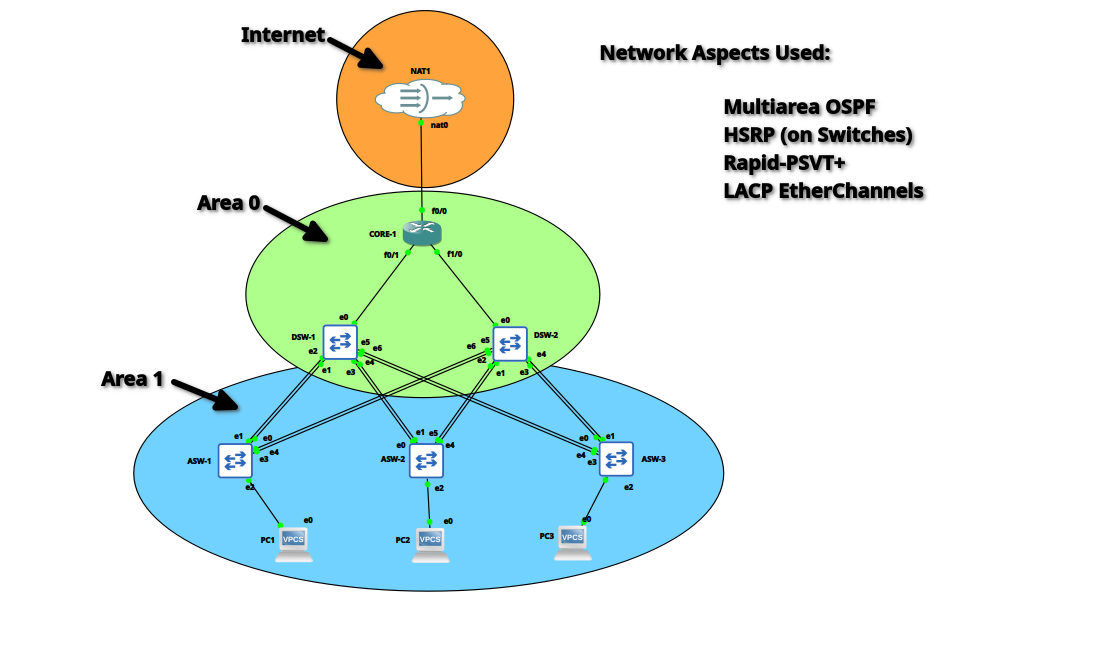
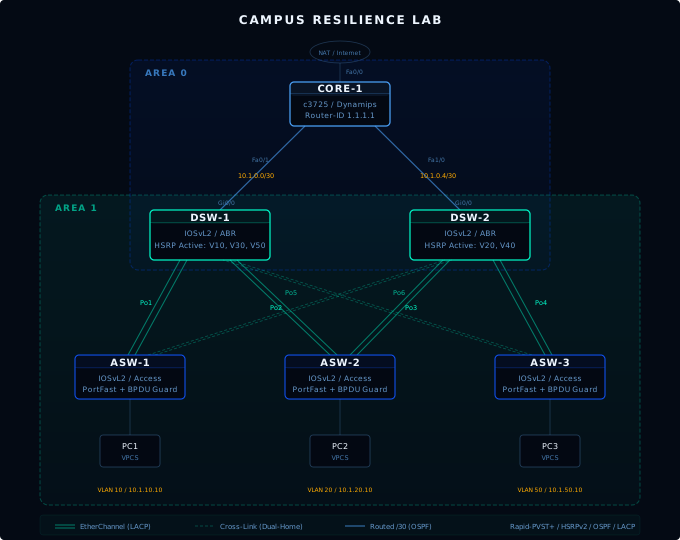
The lab emulates a realistic three-tier campus design: a single core router (c3725 Dynamips) in OSPF Area 0, two distribution switches (IOSvL2) serving as Area Border Routers between Area 0 and Area 1, and three access switches (IOSvL2) providing endpoint connectivity. Each access switch is dual-homed to both distribution switches via LACP EtherChannels, giving every endpoint two independent paths upstream.
The addressing scheme uses 10.1.x.0/24 subnets per VLAN (Data, Voice, Management, Guest, Server) with VLAN 99 as a dedicated native VLAN. Distribution-to-core links are individual routed /30 segments: 10.1.0.0/30 for DSW-1 and 10.1.0.4/30 for DSW-2. HSRP virtual IPs sit at the .1 address of each subnet.
| VLAN | Name | Subnet | HSRP VIP |
|---|---|---|---|
| 10 | Data | 10.1.10.0/24 | 10.1.10.1 |
| 20 | Voice | 10.1.20.0/24 | 10.1.20.1 |
| 30 | Management | 10.1.30.0/24 | 10.1.30.1 |
| 40 | Guest | 10.1.40.0/24 | 10.1.40.1 |
| 50 | Server | 10.1.50.0/24 | 10.1.50.1 |
| 99 | Native | Trunk native | N/A |
// Section 03
Four Layers of Redundancy
Each protocol addresses a different failure domain. Together they form a defense-in-depth approach to campus availability, and each one maps directly to a CCNP ENCOR exam objective.
- LACP EtherChannels (6 bundles, 2 members each)
- One cable dies, the bundle absorbs it
- No STP reconvergence on single-member loss
- Rapid-PVST+ with per-VLAN root tuning
- DSW-1 root for VLANs 10, 30, 50
- DSW-2 root for VLANs 20, 40
- HSRPv2 on all distribution SVIs
- Active/standby aligned with STP root
- Failover in ~10 seconds with preempt
- OSPF multi-area (Area 0 + Area 1)
- ECMP across both distribution uplinks
- Area summarization (10.1.0.0/16 into backbone)
// Section 04
Failure Scenarios
Three failure scenarios tested each redundancy layer with before/after CLI output transcriptions and 36 total screenshots documenting convergence behavior. Each scenario was run after the dual-homing fix (Po5/Po6 cross-links) and the RSTP mode correction on access switches.
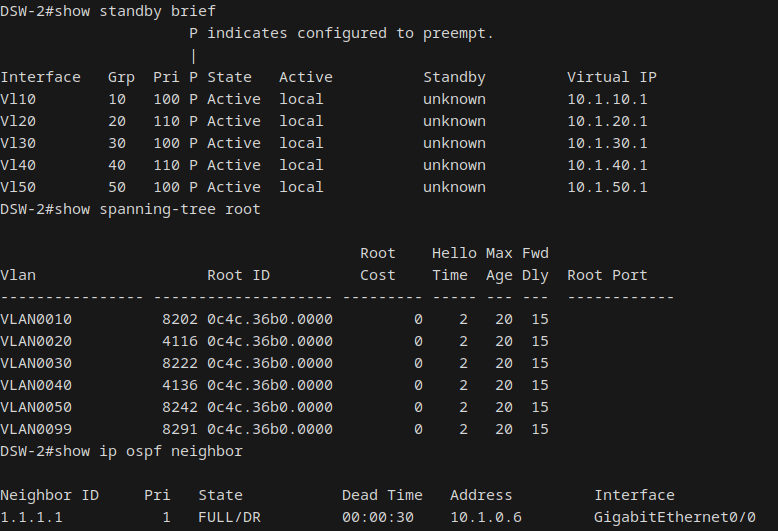
Full shutdown of DSW-1 via interface range to test HSRP failover, STP reconvergence, and OSPF neighbor loss simultaneously. DSW-2 transitioned from Standby to Active for VLANs 10, 30, and 50 within the HSRP hold timer (~10 seconds). STP elected DSW-2 as root for all VLANs (inheriting its secondary priority of 8192). ASW-1's root ports shifted entirely to Po5 (to DSW-2). OSPF on CORE-1 lost the DSW-1 neighbor after the 40-second dead timer, dropping to a single next-hop via DSW-2.
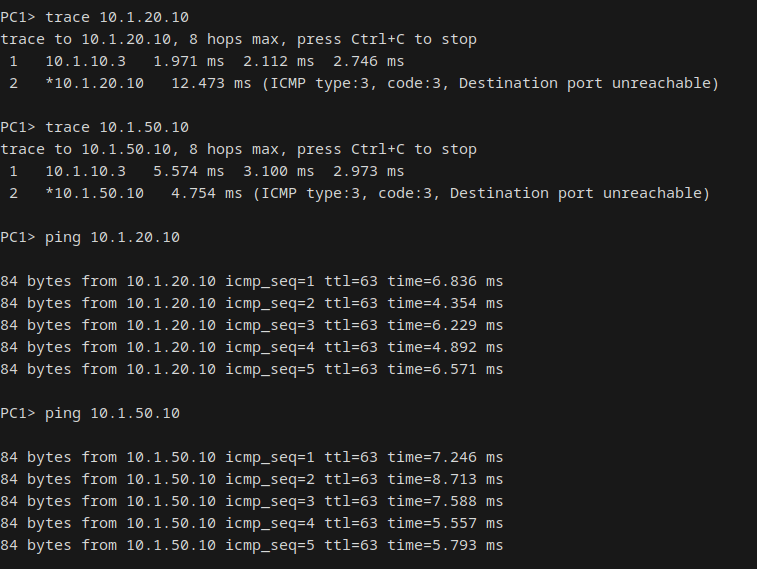
The clearest proof point was the traceroute first-hop shift: before the failure, PC1's first hop was 10.1.10.2 (DSW-1). After failover, it shifted to 10.1.10.3 (DSW-2), confirming the HSRP VIP had moved. 100% ping reachability to both PC2 and PC3 throughout.
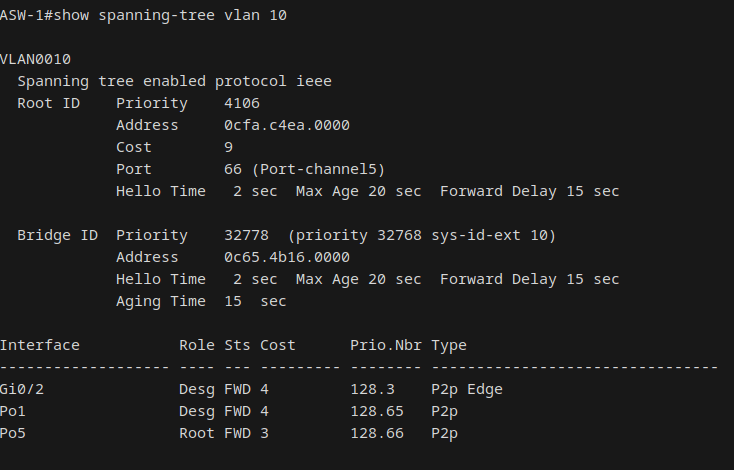
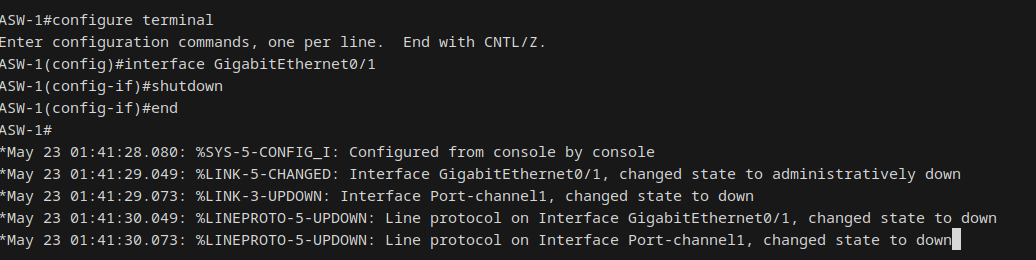
Tested both single-member loss and full-bundle loss on Po1 (ASW-1 to DSW-1). On single-member shutdown (Gi0/0), Po1 stayed up on the surviving member. No port-channel state change message was generated; the bundle absorbed it silently. However, the STP cost on Po1 increased from 3 (two members) to 4 (one member), making Po5 (cost 3, both members intact) the lower-cost path. STP correctly shifted the root port from Po1 to Po5.
On full-bundle loss (both members shut), Po1 went to SD (Layer2 Down) and disappeared from the STP topology entirely. All traffic flowed through Po5. Latency increased from ~5ms baseline to ~10-16ms due to the longer path through DSW-2. On restoration, LACP rebundled both members in approximately 5 seconds, Po1 returned as root port, and STP converged back to baseline.
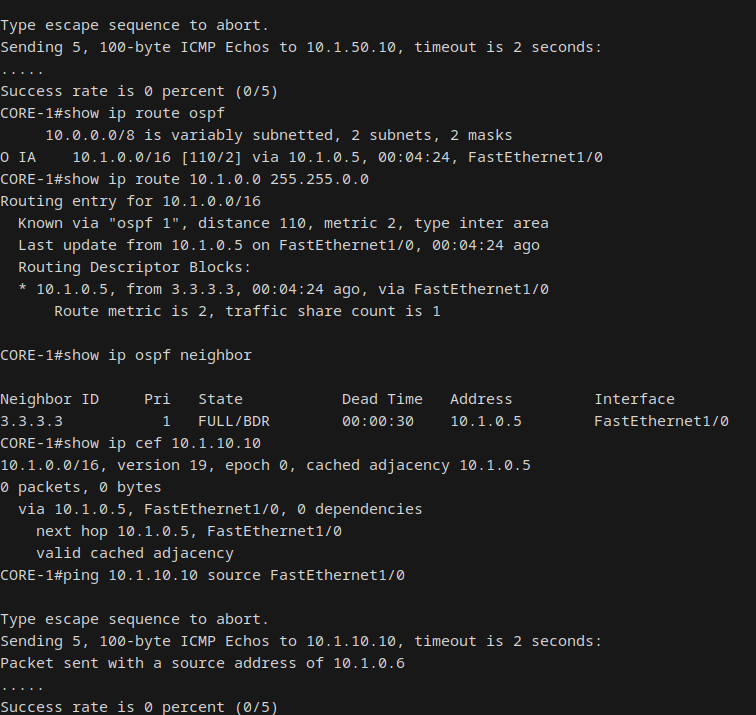
Shutdown of CORE-1 Fa0/1 (link to DSW-1) to force OSPF reconvergence. CORE-1 detected the neighbor loss immediately (local interface down, no dead timer wait). DSW-1 had to wait the full 40-second dead timer since its Gi0/0 link stayed physically up; it detected loss via missed hellos. CORE-1 fell back to a single OSPF path via DSW-2, CEF updated within seconds.
Critically, HSRP and STP were completely unaffected. DSW-1 remained HSRP Active for VLANs 10, 30, 50. Endpoint-to-endpoint traffic (PC1 to PC3) worked perfectly because inter-VLAN routing at the distribution layer uses connected SVIs and doesn't depend on OSPF. The failure only impacted core-to-endpoint reachability, and it surfaced the Null0 asymmetric routing black hole documented in Key Findings.
// Section 05
Key Finding: Null0 Asymmetric Routing
The most significant finding came from Scenario 3. After shutting down the CORE-1-to-DSW-1 link, CORE-1 had a valid single-path OSPF route to all endpoints via DSW-2. But pings from CORE-1 to endpoints behind DSW-1 failed silently.
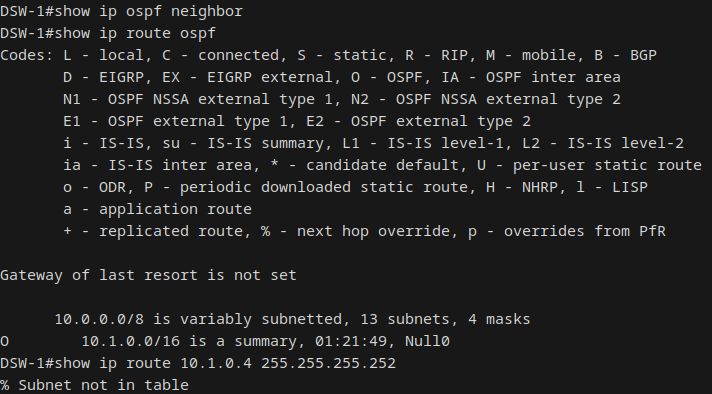
The root cause was asymmetric routing combined with the Null0 discard route installed by OSPF area summarization. The forward path worked: CORE-1 sent traffic via DSW-2, which reached the endpoint. But the return path failed: the endpoint sent its reply to the HSRP VIP, which was still DSW-1 (still HSRP Active for VLANs 10, 30, 50). DSW-1 needed to route the reply back to CORE-1's source subnet (10.1.0.4/30), but with DSW-1's OSPF adjacency down, the more-specific /30 route was gone. The return traffic matched the area summary's Null0 route (10.1.0.0/16) and was silently dropped.
This is expected OSPF behavior. The Null0 route prevents routing loops in area summarization, but it creates a black hole when an ABR loses its backbone adjacency while still serving as the HSRP Active gateway. In a production network, HSRP tracking (decrementing priority when the uplink goes down) would trigger a failover and eliminate the asymmetry. After restoring the link, the more-specific /30 route returned and overrode the Null0 summary, restoring full reachability.
// Section 06
Implementation Challenges
Not everything went according to the design doc. Several issues surfaced during implementation that required real troubleshooting, and each one reinforced a concept more effectively than any study guide could.
Initially attempted IOS on Unix (IOU) images for lower RAM footprint (~256MB vs ~768MB per node). Hit a chain of issues on bare-metal Fedora: missing 32-bit libcrypto, IOURC license keyed to the wrong hostname, and community keygen scripts producing rejected keys. IOU licensing on bare-metal Linux outside the GNS3 VM appliance is unreliable.
During Phase 4 testing, the initial EtherChannel degradation scenario converged incorrectly. The root port moved to Po5 AND the HSRP virtual MAC was learned on the wrong port, breaking traffic flow. Root cause: distribution switches were running Rapid-PVST+ while access switches were on classic PVST+. The version mismatch caused distribution switches to fall back to slow 802.1D timers on access-facing ports (visible as a "Peer(STP)" flag on DSW-1's Po1).
spanning-tree mode rapid-pvst to ASW-1, ASW-2, and ASW-3. Post-fix, PortFast edge engaged immediately, LACP bundles formed in ~5 seconds, and all failure scenarios converged correctly.After configuring OSPF, all traffic from CORE-1 preferred the DSW-2 path. The ECMP dual next-hops that should have been installed were missing. Root cause: CORE-1's Fa0/1 (to DSW-1) was auto-negotiating to 10 Mbps (OSPF cost 10), while Fa1/0 (to DSW-2) was at 100 Mbps (cost 1). The c3725 Dynamips image doesn't auto-negotiate speed consistently with IOSvL2.
speed 100 on Fa0/1, equalizing both interfaces to cost 1. CORE-1 immediately installed ECMP dual next-hops for the summary route.The initial Phase 4 test of Scenario 1 (DSW-1 shutdown) revealed that ASW-1 was completely islanded. It only had an uplink to DSW-1 via Po1; when DSW-1 went down, PC1 lost all connectivity. This was a topology design gap, not a protocol issue.
// Section 07
Lab Environment
| Device | Image | Role |
|---|---|---|
| CORE-1 | c3725 (Dynamips) | Core router, OSPF Area 0, Router-ID 1.1.1.1 |
| DSW-1 | IOSvL2 (QEMU) | Distribution switch, ABR, HSRP Active V10/V30/V50 |
| DSW-2 | IOSvL2 (QEMU) | Distribution switch, ABR, HSRP Active V20/V40 |
| ASW-1 | IOSvL2 (QEMU) | Access switch, PortFast + BPDU Guard |
| ASW-2 | IOSvL2 (QEMU) | Access switch, PortFast + BPDU Guard |
| ASW-3 | IOSvL2 (QEMU) | Access switch, PortFast + BPDU Guard |
| PC1/PC2/PC3 | VPCS | Endpoint simulation (VLANs 10, 20, 50) |
// Section 08
Key Takeaways
Redundancy layers are independent but interconnected
Each protocol handles its own failure domain, but the interactions between them matter. STP root assignment must align with HSRP active status, or traffic follows suboptimal paths. OSPF area summarization interacts with HSRP in ways that aren't obvious until you break something.
Dual-homing is non-negotiable in campus design
A single-homed access switch is a single point of failure that no amount of protocol tuning can fix. The topology gap was only caught by actually running the failure scenario. This is the kind of thing that shows up in production at 2 AM if you don't test it in the lab.
STP version consistency matters more than you think
Classic PVST+ and Rapid-PVST+ on different ends of the same trunk causes the Rapid side to fall back to slow 802.1D timers. The resulting convergence behavior is subtly wrong in ways that are hard to diagnose without knowing the mismatch exists. Always verify show spanning-tree reports the same protocol on both ends.
OSPF area summarization has a hidden failure mode
The Null0 discard route is there for a good reason (loop prevention), but it creates a black hole when an ABR loses its backbone adjacency while still serving as the HSRP Active gateway. In production, HSRP interface tracking would catch this and trigger a failover. In the lab, it was the single most instructive finding.
Break things on purpose before they break on their own
Every failure scenario in this lab surfaced at least one behavior that wasn't in the design doc. The RSTP mismatch, the dual-homing gap, the Null0 asymmetry, the STP cost shift on EtherChannel degradation. None of these would have been caught by reading the config. You have to run the failure to find the failure.